
Download Overcast.fm Mark as Played – Podcast Tools, Productivity Tools
Overview
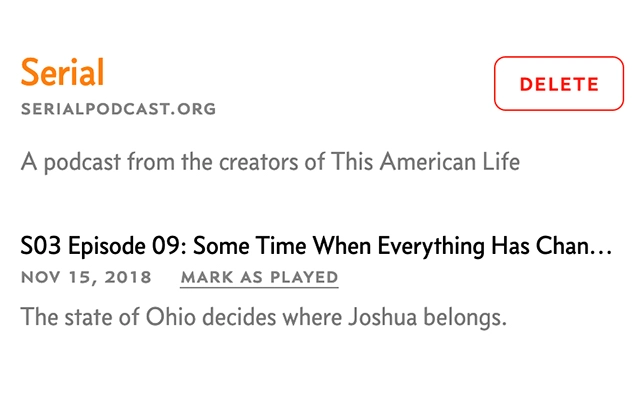
The Overcast.fm Mark as Played browser extension is designed to enhance the podcast listening experience for users who rely on the Overcast.fm platform. It addresses a common frustration: the inability to easily mark episodes as listened to directly on the Overcast.fm website. By adding a dedicated "Mark as Played" button, the extension streamlines the process of tracking completed episodes, reducing the need to toggle between multiple apps or manually manage playback history. This tool is particularly useful for avid podcast listeners who consume content across different devices and platforms.
Target users include personal productivity enthusiasts, digital nomads, and professionals who use podcasts for learning, entertainment, or staying informed. The extension is ideal for those who value efficiency and organization in their daily routines. While the developer is not affiliated with Overcast.fm, the tool reflects a deep understanding of the platform’s workflow and user needs. It is intended for use on desktop browsers, allowing seamless integration with existing listening habits.
The extension operates within the browser environment, requiring no installation beyond standard browser add-on procedures. Its primary function is to improve user control over playback history without altering the core functionality of Overcast.fm. This makes it a lightweight yet practical solution for users seeking to maintain a clean and accurate podcast library.
Key Features & Capabilities
- Direct "Mark as Played" Button – Adds a visible button on Overcast.fm episode pages, allowing users to instantly mark episodes as completed with a single click.
- Seamless Browser Integration – Works directly within supported desktop browsers without requiring additional apps or complex setup.
- Non-Intrusive Design – Maintains the original look and feel of Overcast.fm, ensuring a consistent user experience.
- Real-Time Sync (if applicable) – Updates playback status across devices when used in conjunction with Overcast.fm’s sync features.
- Privacy-First Approach – Does not collect or transmit user data; all actions occur locally within the browser.
Users can leverage this extension to maintain an accurate listening history, especially when switching between desktop and mobile platforms. For example, a user listening to a long-form podcast on their laptop can mark an episode as played after finishing, ensuring it doesn’t reappear in their "New Episodes" feed. This helps avoid redundant playback and improves content discovery efficiency.
The extension also supports users who prefer to manage their podcast consumption through a web interface. By simplifying the marking process, it reduces cognitive load and enhances workflow consistency. It is particularly beneficial for those who use Overcast.fm as their primary podcast manager but rely on browser access for quick checks or remote access.
User Interface, Workflow & Performance
The extension features a minimalistic user interface that blends seamlessly with the Overcast.fm website. The "Mark as Played" button appears in a logical location on each episode’s page, typically near the playback controls, ensuring easy visibility and access. Navigation remains unchanged, as the extension does not alter the underlying site structure.
Workflow efficiency is significantly improved by eliminating the need to manually track listened episodes or switch between apps. Users can complete the marking process in under five seconds, contributing to a smoother overall experience. The extension is designed to be lightweight, with no noticeable impact on browser performance during normal use.
The developer did not specify resource usage details. Performance observations are based on general software behavior patterns. Stability is expected to be high, as the extension performs a single, focused task without complex background processes. No known issues with browser compatibility were reported, though users should ensure their browser is up to date for optimal functionality.
Compatibility & System Requirements
The Overcast.fm Mark as Played extension is compatible with Windows and Mac operating systems. It supports modern desktop browsers that accept extensions, including Chrome, Firefox, and Safari. The installation size is 1.5 MB, which is typical for browser extensions of this nature.
Exact system requirements were not listed. Compatibility information was partially provided. Users should ensure their browser is updated to the latest version to avoid potential issues. The extension does not require additional software or hardware beyond standard desktop configurations.
Pros and Cons
Pros
- Simple, intuitive interface that integrates smoothly with Overcast.fm
- Eliminates the need to switch between apps to mark episodes as played
- Lightweight with minimal impact on browser performance
- Free to use with no hidden costs or ads
- Privacy-focused design with no data collection
Cons
- Only works with Overcast.fm and does not support other podcast platforms
- Functionality is limited to marking episodes as played; no additional features
- Requires a browser extension manager and compatible browser
- Not affiliated with Overcast.fm, so no official support or updates are guaranteed
- May not work if Overcast.fm updates its site structure
FAQ Section
Is the Overcast.fm Mark as Played extension free to download?
Yes, the extension is available at no cost. There are no subscription fees, in-app purchases, or hidden charges.
Which browsers are supported?
The extension is compatible with major desktop browsers including Chrome, Firefox, and Safari. Users should ensure their browser is updated to the latest version for full functionality.
Does the extension collect user data?
No, the extension does not collect or transmit any personal or usage data. All actions are processed locally within the browser.
Can I use this extension on mobile devices?
No, this extension is designed for desktop browsers and is not available for mobile platforms.
Will the extension work if Overcast.fm changes its website layout?
There is no guarantee. Since the extension relies on the current structure of Overcast.fm, changes to the site could affect its functionality. The developer may release updates if needed.
Final Thoughts + CTA
The Overcast.fm Mark as Played extension delivers a focused, practical solution for users who value organization and efficiency in their podcast consumption. While it serves a narrow purpose, it does so effectively, eliminating a minor but persistent annoyance in the Overcast.fm experience. Its lightweight design, privacy-first approach, and free availability make it a compelling choice for anyone invested in managing their listening history.
Although not officially affiliated with Overcast.fm, the tool demonstrates thoughtful design and a clear understanding of user needs. It is ideal for dedicated podcast listeners who use the web interface regularly and want a cleaner, more consistent experience. For those seeking a simple, reliable way to mark episodes as played without switching apps, this extension is a must-have.
Download Overcast.fm Mark as Played now







